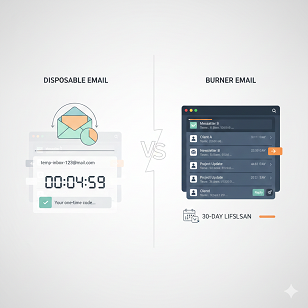
Disposable Email vs Burner Email: What’s the Difference?
(And Which One Keeps You Safer Online)
You’re signing up for a free trial, downloading a PDF, or entering a contest, and boom—there it is: the dreaded “Enter your email” box. You pause. You know what’s coming next: newsletters you’ll never read, “we miss you” pings, and maybe even a sketchy data breach. So you do what millions of us do—you reach for a quick fake address. But wait: do you need a disposable email or a burner email? Same thing, right? Not quite. Grab a coffee and two minutes; by the end of this guide you’ll know exactly which one to use, when to use it, and how to stay one step ahead of inbox clutter and privacy nightmares.
What You’ll Learn
- The real difference between disposable and burner emails (spoiler: it’s not just the name)
- Everyday situations where each one shines
- Pros, cons, and hidden risks nobody tells you about
- Step-by-step setup tips that take under 60 seconds
- Expert tricks to keep your primary inbox squeaky-clean and your identity safe
Disposable Email vs Burner Email: The 30-Second Overview
Disposable email = short lifespan (think hours), no password, no recovery.
Burner email = medium lifespan (think days to months), password-protected, you control it.
Both protect your real address, but they serve different purposes—like comparing a paper napkin to a washable hand towel. One is uber-temporary; the other is temporary-but-reusable.
What Is a Disposable Email?
Imagine a public whiteboard in a busy hallway. You scribble a note, walk away, and ten minutes later someone else erases it. That’s a disposable email. Services like TempMail, 10MinuteMail, or Guerrilla Mail give you a random address that lives anywhere from 10 minutes to 24 hours. No signup, no password, no forwarding. You copy the address, paste it into the annoying form, click “verify” fast, and forget it ever existed.
Real-life win
Last week I grabbed a free Adobe Stock trial. Adobe wanted my “real” email to send me 47 follow-ups. I used a disposable address, confirmed the link, downloaded the trial photos, and—poof—the inbox self-destructed before Adobe could spam me.
Hidden catch
Because the inbox is public, anyone who guesses the address can see the same messages. Great for a coupon code; terrible for password-reset links or anything tied to your identity.
What Is a Burner Email?
Now picture a prepaid flip phone. You buy it with cash, text your buddies for a week, then toss it in a lake. Burner emails work the same way. Services like SimpleLogin, AnonAddy, or Firefox Relay generate a unique address that forwards to your real inbox. You can turn it off, delete it, or let it die whenever you want—days, weeks, or months later. You usually create a password and can even reply from the alias so nobody spots your actual address.
Real-life win
I’m house hunting. Zillow, Redfin, and five random real-estate agents all want my email. I created one burner alias: [email protected]. Every listing, open-house reminder, and “rates are rising!” panic email lands in my real inbox—until I buy the house. Then I nuke the alias. No loose ends, no unsubscribes, no drama.
Hidden catch
Because mail forwards to you, the service technically sees your real address. Pick a provider with a no-log policy (more on that below).
Head-to-Head: Disposable Email vs Burner Email
Below is a quick table you can screenshot for later.
TableCopy
When to Use a Disposable Email (Use-Case Cheat Sheet)
- One-time coupon codes or gated PDFs
- Forum signups you’ll never visit again
- Quick software trials under 24 hours
- Wi-Fi hotspots that demand email (looking at you, airport lounge)
- Any site that feels sketchy and you just need to click “confirm”
Pro tip
Copy the address immediately—some services refresh the page every few minutes and you’ll lose it.
When to Use a Burner Email (Use-Case Cheat Sheet)
- Shopping on a site you might return to (think holiday pop-up store)
- Newsletters you want for a season (NCAA basketball, anyone?)
- Dating apps until you trust the match
- Classified ads (Craigslist, Facebook Marketplace)
- Developers testing sign-up flows without polluting the company domain
Pro tip
Name your aliases so you remember why you created them: “nike-sale-2025” or “zoom-webinar-mar.” Future you will thank present you.
How to Set Up a Disposable Email in 3 Clicks (No Tech Skills Needed)
- Open 10MinuteMail.com (or any similar site).
- The site auto-creates an address—copy it.
- Paste into the form, hit refresh on 10MinuteMail to see incoming mail.
Done. When the timer hits zero, the inbox vanishes like a Snapchat message.
How to Set Up a Burner Email in Under 60 Seconds
- Pick a provider: SimpleLogin (free tier, open-source), AnonAddy (free tier), or Firefox Relay (built into the browser).
- Create an account—yes, you’ll use your real email here, but only once.
- Generate a new alias. You can choose the domain or let the system randomize it.
- Use the alias anywhere. Mail arrives in your normal inbox; you can reply and it still masks your real address.
- Delete the alias anytime—like turning off a faucet.
Security & Privacy: The Stuff Nobody Tells You
Disposable emails are public. If the inbox contains a password-reset link, anyone who knows the address (or guesses it) can click it first. Burner emails are private, but the forwarding service can technically read your mail. Stick to providers that encrypt logs and have open-source code—SimpleLogin and AnonAddy both publish their code on GitHub and offer PGP encryption.
Extra safety layer
Use a unique password plus 2FA on your burner-email account. If someone hijacks it, they could create new aliases and intercept your mail.
SEO & Marketing Perspective: Why Companies Hate Both (and Why You Shouldn’t Care)
Marketers call disposable addresses “dirty emails.” They skew open-rate metrics and trigger spam filters. Some even block entire domains like tempmail.org. That’s good news for you—means the filter is working. Ethically, you owe no company your real address unless money or sensitive data changes hands. Your inbox, your rules.
Advanced Tricks: Merge Burner Emails With Password Managers
Most of us reuse passwords (yes, even you). Pair a burner alias with a strong, unique password stored in Bitwarden or 1Password. Now if the site leaks data, criminals get a useless email and a password that works nowhere else. It’s like giving a burglar a fake house key.
Common Myths—Busted
Myth 1: “Disposable emails are illegal.”
Truth: 100 % legal in most countries. Just don’t use them for fraud.
Myth 2: “Burner emails are only for criminals.”
Truth: Privacy is a right, not a red flag.
Myth 3: “Gmail aliases work the same.”
Truth: [email protected] still reveals your base address; burner aliases don’t.
FAQ: The Questions Everyone Googles Next
Q1. Can a website detect I’m using a disposable or burner email?
Sometimes. Services like Kickbox or ZeroBounce maintain blacklists. If your domain is on it, the signup form may reject you. Premium burner services use lesser-known domains to dodge these lists.
Q2. Will burner emails work with two-factor authentication?
Yes. The forwarded email contains the 2FA code just like any other message. You can even reply to some services if you need to send a code back.
Q3. Are there completely free burner email providers?
Yes. SimpleLogin and AnonAddy both have free tiers—usually 10–15 aliases. For unlimited aliases and custom domains, expect to pay $3–4 a month, less than a fancy latte.
Q4. Can I recover a deleted burner alias?
Usually no. Once you nuke it, it’s gone forever—like burning the prepaid phone. That’s the point.
Q5. Do disposable emails expire exactly when the timer ends?
Often sooner if you close the browser or clear cookies. Copy anything important immediately.
Q6. Is it safe to use burner emails for banking?
Big nope. Banks need your real info for KYC (Know Your Customer) laws. Use burner emails for low-stakes sites only.
Quick Checklist Before You Hit “Submit”
- Does the site involve money or identity docs? Use your real email.
- One-time download? Disposable.
- Might need receipts or support later? Burner.
- Feeling lucky? Roll the dice—just don’t cry when spam arrives.
Conclusion: Pick the Right Shield for the Right Battle
Disposable emails are the paper plate—grab it, use it, trash it. Burner emails are the Tupperware—reuse until it smells funky, then recycle. Know the difference and you’ll cut inbox clutter, dodge data breaches, and keep your real address as private as your phone number. Next time that “Enter your email” box pops up, you’ll smile instead of sigh—because you’ve got the perfect alias locked and loaded. Happy (spam-free) surfing!





