Stop Using Your Real Inbox: The Ultimate Email Alias Alternative Guide for 2026
If there is one thing I’ve learned after years of auditing digital privacy setups, it’s this: handing out your real email address in 2026 is the digital equivalent of leaving your front door wide open.
Between sophisticated phishing attacks, endless data breaches, and companies aggressively selling user data, your primary inbox is a goldmine for bad actors. You sign up for a harmless newsletter on Monday, and by Friday, you are drowning in spam.
For a long time, the go-to solution was a quick burner email. But today, most modern platforms instantly block temporary domains. You need a sustainable, long-term solution. You need a reliable email alias alternative.
In this guide, I am going to walk you through exactly how to protect your email from spam, hide your real email address permanently, and set up a system that keeps your digital life entirely private.
What Exactly is an Email Alias Alternative?
In my experience, most people confuse a temporary disposable address with a true email privacy service.
A traditional disposable email (like a 10-minute mail) self-destructs. If you ever need to reset a password for that account later, you are locked out permanently.
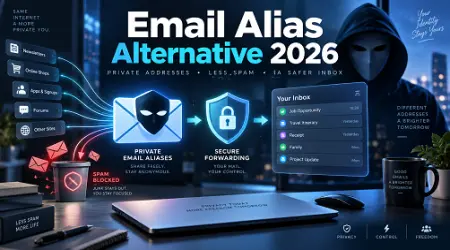
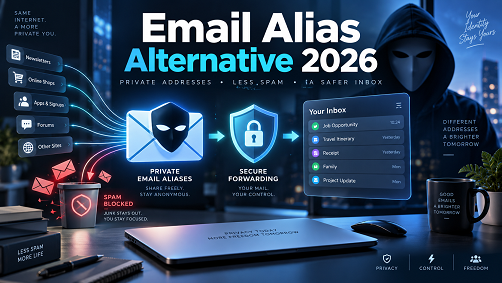
An email alias alternative, on the other hand, is a permanent, masked email address that forwards messages directly to your real inbox. When you reply, the service intercepts your message and sends it back out through the masked address. The recipient never sees your real identity.
Think of it as a digital middleman. It provides secure email forwarding, allowing you to cut off communication from a specific sender with a single click if they start spamming you, without losing access to your other important accounts.
Why Traditional Burner Emails Are Dead in 2026
What most people don’t realize is that website administrators have caught on to temporary email alternatives.
If you try to register for a SaaS product, an online store, or even a webinar using a known burner domain, the system will likely flag and reject it. Companies want your real data, and they use advanced filters to block "junk" registrations.
Furthermore, the old Gmail trick—adding a plus sign to your email (e.g., [email protected])—is practically useless now. Data brokers simply run automated scripts to strip out the "+" and everything after it, revealing your core address.
To achieve real email privacy protection today, you have to use intelligent email masking services that generate unique, legitimate-looking addresses that cannot be tied back to you.
See here………Top digital marketing strategies that work 2026
Top Tech Hacks: Finding the Best Email Alias Alternative
After working with countless privacy-conscious users, I've categorized the best privacy email tools into three distinct tiers. Here is how you can set up a private email alias based on your technical comfort level.
1. Dedicated Email Masking Services (The Gold Standard)
If you want the best email alias alternative, dedicated masking services are the way to go. These platforms generate unique, random email addresses on the fly via browser extensions or mobile apps.
- How it works: You visit a checkout page, click the extension icon, and it generates a masked email address (like
[email protected]).
- The benefit: It seamlessly provides anonymous email forwarding directly to your Gmail or ProtonMail account.
- Pro Tip: Many top-tier virtual private networks (VPNs) and password managers now bundle premium email masking into their subscriptions. Upgrading to a comprehensive privacy suite is often the most cost-effective way to get unrestricted alias creation while keeping your entire digital footprint secure.
2. Custom Domain Catch-Alls (The Power User Hack)
This is a hidden feature that tech-savvy users swear by. Instead of relying on a third-party service's domain, you buy your own cheap domain name (e.g.,
mymailvault.com).
- How it works: You set up a "catch-all" rule with your domain registrar.
- The benefit: You can make up addresses on the spot without opening an app. Signing up for Netflix? Just type
[email protected]. Buying shoes? Type[email protected]. Everything routes to your real inbox. - The downside: If your entire domain gets scraped and targeted by spammers, you might have to disable the catch-all rule.
3. Integrated Provider Solutions
If you are heavily embedded in specific ecosystems, you might already have an anti-spam email service built into your devices.
- Apple’s "Hide My Email" is a fantastic built-in private email alias generator for iCloud+ users.DuckDuckGo offers a free email privacy service (
@duck.com) that strips trackers from incoming emails before forwarding them to you.
Step-by-Step: How to Hide Your Real Email Address Today
Ready to lock down your inbox? Here is a practical, step-by-step workflow to implement a secure email alias system right now.
- Audit Your Current Accounts: Identify your most critical accounts (banking, medical, government). Leave these tied to a highly secure, private primary email address.
- Choose Your Email Privacy Service: Select a dedicated alias generator (like the ones bundled with premium password managers) or set up a custom domain.
- Install the Browser Extension: To make this frictionless, install your chosen tool’s browser extension. This ensures you can generate a secure email alias with one click during any signup process.
- Create a New Alias for Every New Service: From this day forward, never use your real email for a newsletter, social media platform, or e-commerce store. Generate a unique masked email address for each one.
- Monitor and Deactivate: When a company inevitably suffers a data breach or sells your info, you will know exactly who did it because the spam will come to their specific alias. Simply toggle that alias off.
Real-World Example: How I Eliminated Spam Overnight
A few years ago, I was receiving upwards of 100 spam emails a day. It was destroying my productivity.
Instead of aggressively unsubscribing (which often just confirms to spammers that your inbox is active), I migrated to a secure email forwarding setup.
I created a specific alias for a marketing conference I attended. Three months later, I started getting spam emails about crypto investments sent to that exact alias. It was immediately clear that the conference organizers had either sold the attendee list or been hacked.
Because I used a burner email alternative, my primary inbox was never compromised. I simply logged into my alias dashboard, deactivated that specific address, and the crypto spam stopped instantly. No filter rules required. That is the true power of private email forwarding.
See here………..Best TH12 Farming Base Layouts in Clash of Clans (Ultimate Guide 2025)
The Pros and Cons of Using an Email Privacy Service
Before you overhaul your digital life, it is important to weigh the realities of using an email alias service in 2026.
The Pros:
- Total Spam Elimination: Kill spam at the source by deactivating compromised aliases.Data Breach Protection: Hackers cannot cross-reference your accounts because every login uses a different email address.
- Tracker Blocking: Many modern masking tools automatically strip hidden tracking pixels from incoming emails.
- Inbox Organization: You easily identify exactly who is sending you what.
The Cons:
- Slight Learning Curve: It takes a few days to get used to managing multiple aliases instead of typing your real email out of habit.
- Reply Complexity: Replying to an email from an alias requires the service to correctly mask your outbound reply. If not configured correctly, you might accidentally expose your real address.
- Dependence on a Third Party: If your email masking service goes out of business, you could lose access to your forwarding routes. (This is why choosing established, premium services matters).
3 Common Mistakes When Setting Up Secure Email Forwarding
Even experienced users trip up when transitioning to an anti-spam email service. Avoid these pitfalls:
1. Using one alias for multiple websites.
The entire point of an email alias alternative is compartmentalization. If you use the same alias for Twitter, Facebook, and Instagram, and one gets breached, you have to update all three. Always use a 1:1 ratio—one alias per service.
2. Replying directly from your primary client without checking.
If you receive a forwarded email and hit "Reply" from your standard Gmail app without ensuring the alias service intercepts it, your real email address will be visible in the "From" field. Always use the service's designated reply feature.
3. Using aliases for your bank or primary identity.
Do not use a temporary email alternative for your mortgage broker, IRS portal, or primary bank. For highly sensitive, identity-critical institutions, use a dedicated, highly secure inbox (like a paid ProtonMail account) that you never share anywhere else.
Frequently Asked Questions (FAQs)
Are email aliases legal?
Yes, absolutely. Using an email alias for privacy is completely legal. It is a standard privacy practice recommended by cybersecurity experts to protect consumers from identity theft and unsolicited tracking.
Will emails sent to an alias land in my spam folder?
Generally, no. A reputable email alias service in 2026 utilizes high-quality IP reputations. However, you should add your alias forwarding domain to your primary inbox's safe sender list just to be sure.
Can I reply to an email using my masked email address?
Yes. The best email alias alternatives offer "reverse aliases." When you hit reply, the message goes to the service's server first, strips your real address, applies the alias, and sends it to the recipient.
Is a VPN the same as an email alias?
No. A VPN hides your IP address and encrypts your internet traffic, while an email alias hides your email address. However, they work perfectly together. Many top privacy suites now offer both in one package.
What happens if the alias service shuts down?
If the service closes, your forwarded emails will bounce. To mitigate this risk, choose well-established companies or use the custom domain method, which allows you to move your domain to another provider if needed.
Final Thoughts on Protecting Your Inbox
Reclaiming your digital privacy isn't about hiding in a cave; it is about taking control of your personal data.
Relying on your real email address for every random download, newsletter, and online purchase is a recipe for endless spam and security risks. By implementing a high-quality email alias alternative, you create a buffer between your real identity and the chaotic, data-hungry internet of 2026.
Start small. The next time you are asked to enter an email address for a 10% discount code, don't give them the keys to your digital life. Generate a secure email alias, grab your discount, and enjoy a cleaner, safer inbox.