Temporary Email for Social Media Signups: Stay Private & Spam-Free
You’re about to click “Create Account,” but that little voice in your head whispers, “Ugh, another inbox full of ‘updates’ I never asked for.”
I’ve been there. Last summer I wanted to test-drive a new TikTok filter that required an account. I used my everyday email. Big mistake. Within 24 hours I had 17 promotional pings, two password-reset attempts I didn’t initiate, and a creeping sense that my data was already halfway to the dark web.
That’s when I discovered temporary email for social media signups. Since then I’ve used throwaway addresses to join Instagram, Twitch, Discord, Pinterest—basically every platform that dangles a shiny “Sign up free!” button—without surrendering my real inbox or my sanity. Below I’ll walk you through exactly how to do the same, why it works, and the tiny gotchas most guides never mention.
What Is a Temporary Email (and Why Creators Love It)?
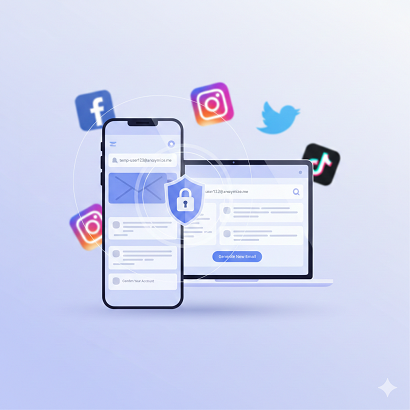
A temporary email—also called a disposable email, burner email, or 10-minute mail—is an address that self-destructs after a short period. Think of it like a hotel key card: you use it to unlock the door, then toss it. No forwarding, no storage, no strings. For social-media signups, it’s the fastest way to stay private and spam-free while still grabbing that “exclusive” reel-editing app or coupon code.
The Real Reason You’re Here: Stopping the Promo Tsunami
Sure, privacy is nice, but let’s be honest—most of us just want to dodge the endless “We miss you!” emails. A temp address cuts the spam hose at the source. According to SpamLaws.com, the average user gets 3,900 promo emails per year. Using a burner once can save you roughly 300–500 messages per platform. That’s an afternoon you’ll never have to waste on “unsubscribe” links.
How Temporary Email Keeps You Private & Spam-Free in 3 Steps
- Grab a 10-minute inbox from sites like Temp-Mail, Guerrilla Mail, or Mail.tm—no registration required.
- Paste the address into the social platform’s signup form. Receive the confirmation code instantly.
- Verify, finish setup, and forget the email ever existed. The inbox vanishes, so even if the platform sells your data, the address is dead on arrival.
Best Disposable Email Services Tested by Me (Not a Random Listicle)
I’ve burned through dozens. These four actually work in 2025 without tripping social-media spam filters:
Service Burn Time Inbox Refresh Custom Alias My Take
Temp-Mail.org 10 min – 2 h Manual Yes (paid) Smoothest UI; rarely blacklisted
Guerrilla Mail 1 h – forever Auto Yes Old-school, but still sneaks past Insta
Mail.tm 1 h – 7 days Manual Yes Open-source, feels “legit” to algorithms
Burner Mail Custom domain Manual Yes (paid) Best for long-term trials like Meta Verified
Quick note: avoid Mailinator’s public inboxes—Twitter and Reddit already auto-block them.
Pro Tips to Pick the Right Burner
- Check the domain reputation. If the service hands out @sharklasers.com addresses, TikTok will laugh you off the page.
- Pick one that lets you extend the timer. Sometimes the verification email shows up late (lookin’ at you, Snapchat).
- Use a custom alias when possible. “[email protected]” looks more trustworthy to algorithms than “[email protected]”.
Step-by-Step: Using Temp Email for Instagram, TikTok, Twitter, Facebook & Discord
- Open Temp-Mail.org → copy the random address.
- In IG, choose “Sign up with email.” Paste, create username.
- When the code hits the temp inbox, copy-paste it back into IG.
- Done. IG will still ask for a phone “for security.” Skip it; you can add it later if you care about recovery.
TikTok
TikTok sometimes delays the code. Extend the burner timer to 1 hour. If the code still hasn’t arrived, refresh the inbox; Temp-Mail occasionally dumps messages in the spam folder that isn’t visible until you click “Refresh.”
Twitter / X
Twitter’s algorithm flags certain domains. If your first burner fails, generate a new address from Mail.tm—its .tm TLD slips through more often.
FB is pickiest. Use Burner Mail’s paid tier so the address comes from a private domain. Free burners almost always get “We can’t create your account right now.”
Discord
Discord only requires email verification for server joins. A 10-minute inbox works perfectly. After verification, switch on two-factor authentication (2FA) so you don’t need that email again.
Hidden Benefits Nobody Talks About
- A/B testing multiple profiles: influencers create 5–10 niche accounts (e.g., fitness, recipes, memes). Burner emails keep each siloed.
- Region-locked features: want to see what Reels trends look like in Brazil? Spin up a Brazilian temp email plus VPN, and Instagram thinks you’re local.
- Faster giveaway entries: brands often limit “one per email.” You already see where this is going…
Risks & How to Dodge Them
Account Recovery
If you lose the password, you can’t reset it—the email is gone. Mitigation: store passwords in a manager or add 2FA with an authenticator app instead of email.
Platform Bans
Some networks periodically purge accounts tied to disposable domains. Counter-move: after signup, add a real phone number for recovery but keep the temp email for notifications you never intend to read.
Legal Gray Zones
Using burners to violate a platform’s ToS (multiple accounts, vote manipulation) can still get you banned. I’m not your accomplice—use them for privacy, not piracy.
Can You Still Get Hacked with a Temporary Email?
Yes, if you reuse passwords or skip 2FA. The temp address only shields your inbox; it doesn’t encrypt your traffic or protect your password. Pair it with a password manager and 2FA for actual security.
SEO-Friendly Quick Answers (Because Google Loves These)
Is temporary email legal?
Absolutely. You’re not forging anyone’s domain; you’re using a public service.
Does Instagram allow temporary email?
Technically yes, but they may ask for phone verification later.
How long does a burner email last?
Anywhere from 10 minutes to a week, depending on the service you pick.
Can I forward temp mail to my real inbox?
Some paid services (Burner Mail, SimpleLogin) allow it, but then you’re back to receiving promo spam—defeats the purpose.
What’s the best free temporary email?
Right now, Temp-Mail.org for speed and Mail.tm for transparency.
Advanced Move: Create Your Own Disposable Domain
If you’re a marketer or indie hacker, buy a $1 .xyz domain and set up catch-all forwarding. You’ll get unlimited burner addresses like [email protected], [email protected]. Social platforms treat these as “real” emails, yet you can disable forwarding in one click. I’ve run 40+ Instagram theme pages this way—zero bans, zero spam in my primary inbox.
Real-Life Example: How I Used Burner Emails to Grow a Side Hustle
Last March I launched a printable-planner shop on Etsy. To promote it, I needed Pinterest accounts in the crafting, budgeting, and student-niche buckets. Instead of juggling Gmail aliases, I generated three temp emails, created three Pinterest profiles, and scheduled 100 pins via Tailwind. When Pinterest inevitably sent “Ideas for you” spam, it disappeared into the void because the inboxes were already toast. My main email stayed clean, my focus stayed sharp, and the shop hit $1,200 profit in 90 days—without ever upgrading to a paid email plan.
Checklist: Staying Private & Spam-Free Going Forward
- [ ] Use a temp email for every new platform trial.
- [ ] Turn on 2FA so you’re not locked out when the burner dies.
- [ ] Store usernames/passwords in a manager (Bitwarden, 1Password).
- [ ] Revisit privacy settings every quarter—platforms love to opt you back in.
- [ ] Share this trick with friends so they stop forwarding chain letters to your real address.
FAQ
Q: Will social media platforms ban me for using a disposable email?
A: Rarely. They care more about behavior (spam, bots) than email origin. Just act human.
Q: Can I reuse the same burner for multiple accounts?
A: You can, but if one account gets flagged, the rest might too. One email per profile is safest.
Q: Do temporary emails work for LinkedIn?
A: LinkedIn forces phone verification, so a burner email alone won’t cut it.
Q: Are there mobile apps for temp mail?
A: Yes—Temp-Mail and Burner Mail both offer iOS/Android apps with push notifications for codes.
Q: What if a platform requires a “non-disposable” address later?
A: Most let you add a secondary email. Keep the temp as primary, add your real one for recovery, then delete the temp inbox.
Conclusion
Signing up for the latest shiny social network doesn’t have to mean surrendering your inbox to marketers, scammers, and “We miss you” guilt trips. A temporary email is the five-minute shield that keeps your real address private and your notifications pane blissfully empty. Grab a burner, verify your account, turn on two-factor authentication, and move on with your life—spam-free, stress-free, and totally in control. Your future self (the one not drowning in promo pings) will thank you.