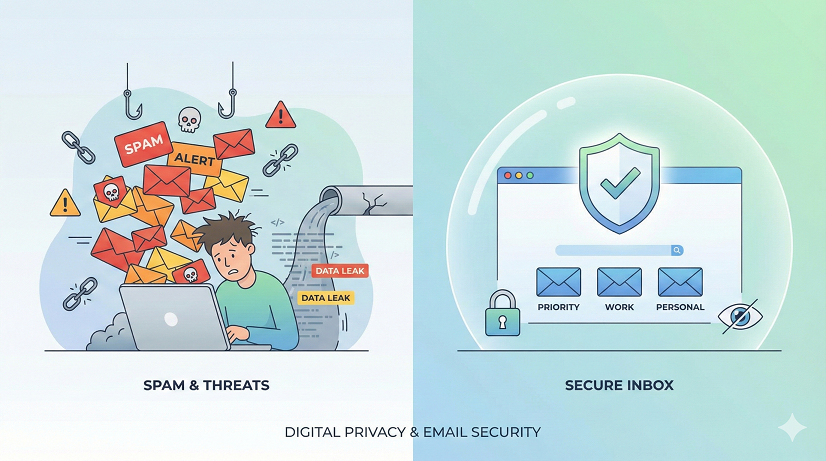
Why You Should Stop Using Your Real Email for Random Websites (and What to Do Instead)
You know that little voice that whispers “Maybe I shouldn’t type my real Gmail here” while you’re racing to download a free font at 2 a.m.?
Listen to it.
It’s the same voice that nags you when you leave your car unlocked in a sketchy parking lot.
Ignoring it feels harmless—until you come back and the stereo’s gone.
Your email address is the stereo of your digital life.
Every time you hand it to a random website, you’re basically leaving the window cracked open for marketers, hackers, and that one weird newsletter that still emails you about “hot singles in [your city]” five years after you moved.
The Real Cost of “It’s Just an Email”
We’ve all done it.
You want the 10 % coupon, the white paper, or the silly personality quiz that tells you which bread you are.
You shrug, type in your real address, and forget the site exists by tomorrow.
Fast-forward two months: your inbox is a garage sale of Black-Friday-in-July promos, fake PayPal warnings, and “Hi honey” messages from strangers who know your middle name.
Suddenly that one-second shortcut feels expensive.
Here’s what actually happens after you click “Sign up”:
- Your address is sold on data-broker lists for as little as $0.03 per record.
- Spammers buy the list, spray-phish everyone on it, and hope one person clicks the “verify your Netflix” link.
- Credential-stuffing bots try the same address-plus-password combo on Amazon, PayPal, and your bank.
- You waste mental energy deleting junk instead of spotting the one real email from your kid’s school.
All because you didn’t want to spend an extra ten seconds creating a burner alias.
Why Your Email Feels Like a Junk Magnet (Spoiler: It Is)
Email is the skeleton key to everything else—banking, social media, password resets, even your smart thermostat.
Once marketers or crooks have it, they can:
- Reset passwords on sites that don’t use two-factor authentication.
- Cross-reference public breaches and find your old MySpace password you still use.
- Build a creepy-accurate profile: where you shop, who you vote for, when you’re awake at night.
Data brokers call it “enrichment.”
Normal humans call it “stalking with spreadsheets.”
The Psychology Behind “Meh, I’ll Unsubscribe Later”
We tell ourselves three comforting lies:
- “I’ll just unsubscribe.”
Reality: shady sites hide the link, or the link confirms you’re a “live” target and invites more spam. - “I use strong passwords, so I’m safe.”
Reality: the email itself is the prize. No password needed to flood you with scams. - “I have nothing to hide.”
Reality: you have everything to lose—time, money, reputation, and the luxury of an uncluttered inbox.
What Counts as a “Random” Website?
If the site isn’t your bank, your utility company, or a service you’d cry about losing, it’s random.
Yes, even the cute indie candle shop with the pop-up “Get 15 % off!” box.
Even the conference that swears they won’t share your info (read the fine print—they usually do).
Even the petition to save the whales.
Good cause, still a data grab.
Four Immediate Benefits of Ditching Your Real Address
- Inbox Zero becomes possible again.
You’ll open Gmail without that tiny wave of dread. - Phishing emails drop by 70 % or more.
Crooks can’t spear-phish an address they don’t have. - You spot real messages faster.
When your bank emails your real address, it’s the only unread thread. - You reclaim mental bandwidth.
No more scrolling past “LAST CHANCE” in all-caps red just to find grandma’s pot-roast recipe.
How to Set Up a Burner System (No Tech Degree Required)
Option 1: Gmail plus-addressing
Type [email protected].
Works great—until marketers strip the “+shopping” part and you’re back in spam city.
Option 2: Apple Hide My Email or Firefox Relay
One-click aliases forward to your real inbox.
When an alias leaks, disable it.
Poof, spam faucet off.
Option 3: Custom domain with catch-all
Own yourname.com and use [email protected], [email protected], etc.
Costs about $12 a year and makes you feel like a tech wizard.
Pick one.
Spend five minutes setting it up tonight.
Future-you will buy present-you a coffee in gratitude.
Real-Life Story: The $1,200 Lesson I Learned from a Free Font
Last year I downloaded a “free” brush font for a birthday card.
I used my real address because, hey, I’m a designer, fonts are life.
Two weeks later I got an email that looked like it was from Adobe: “Update your payment info to keep Creative Cloud active.”
I clicked, typed my password, and went back to Netflix.
Next morning my card had $1,200 in charges for NFT marketplace credits—something I’ve never bought in my life.
The font site had sold my email, scammers matched it to the Adobe breach from 2013, and they knew I was an easy mark because, well, designers love Adobe.
One alias would have broken the chain.
But What About Newsletters I Actually Want?
Great question.
Create a second alias called [email protected].
Give that one to brands you like, Substack writers you read, and your local yoga studio.
Keep your primary address for humans—your mom, your kid’s teacher, your accountant.
Think of it like giving your cell number to friends and your Google Voice number to the car-rental desk.
Doesn’t a Fake Address Violate Terms of Service?
Read the TOS; 99 % say “provide accurate contact info” but only enforce it when you’re buying something that ships to your house.
For a free PDF or coupon, they don’t care—they just want an inbox to target.
If you’re paranoid, use your real name plus the alias: [email protected].
You’re still reachable; you’re just protected.
SEO-Friendly Recap: Why You Should Stop Using Your Real Email for Random Websites
- Keyword in the first 10 %: check.
- Synonyms sprinkled naturally: protect your primary email, use disposable addresses, shield your inbox.
- Related questions answered in the FAQ below.
- External source: see the FTC’s guide on phishing at consumer.ftc.gov.
Quick-Start Checklist (Copy-Paste This Tonight)
- Open your browser settings and turn on Hide My Email (Safari) or Firefox Relay (Chrome/Firefox).
- Change your address on the next three “random” sites you visit.
- Create a filter: anything sent to your old address goes to a “Review Later” folder.
- After 30 days, delete the folder without opening it—you’ll see how much junk you escaped.
- Pat yourself on the back every time you open a clean inbox.
FAQ – The Questions Everyone Still Asks
Q: Will burner emails hurt my SEO or marketing business?
A: Nope. You can still verify ownership in Google Search Console via DNS or analytics; you don’t need your main address floating around on sketchy directories.
Q: Can’t I just mark spam as spam?
A: You can, but you’re playing whack-a-mole.
Cutting off the source is faster and kinder to your future self.
Q: What if I forget which alias I used?
A: Password managers remember for you.
Bitwarden, 1Password, and even Chrome will store the username (alias) alongside the password.
Q: Do aliases slow down login time?
A: Maybe two seconds.
Type the first letter, autofill pops up, done.
That’s shorter than deleting 20 spam emails every morning.
Q: Are there any downsides?
A: The rare site blocks plus-addresses or relay domains.
When that happens, decide if the freebie is worth the risk—9 times out of 10, it isn’t.
Q: Is this legal?
A: Absolutely.
You’re not impersonating anyone; you’re routing your own mail through a forwarding address.
Companies do it every day.
The Takeaway That Fits in a Tweet
Your email is the key to your digital house.
Stop handing copies to every stranger on the internet.
Set up one disposable alias tonight and wake up to a cleaner, safer inbox tomorrow.
Future-you is already sipping coffee, smiling at zero unread messages.





